
Diagnostics and error reports
Moket Studio notices when something goes wrong in your browser: an unexpected error, a failure of the geometry kernel, a lost 3D view or a very slow operation. With automatic error reports on, it sends a short report of the error to Moket so it can be fixed even when nobody reports it.
Access: Settings in the Home sidebar > Diagnostics.
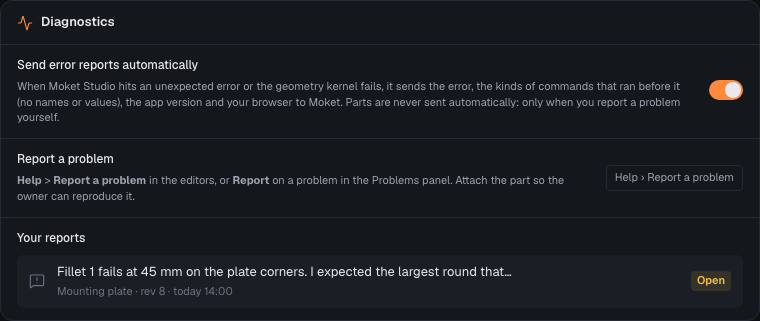
What an automatic report sends
| Sent | Never sent |
|---|---|
| The error, where in Moket Studio it happened and its stack trace | Your parts, drawings or assemblies |
The kinds of the last commands, such as feature.update and core.fillet | Names and values in your commands |
| The app and kernel versions | Screenshots |
| Your browser and system | Anything to other companies |
Reports go to Moket's own server. The same error from one tab is sent once and then only counted.
Turn automatic reports on or off
- Open Settings.
- Under Diagnostics, switch Send error reports automatically on or off.
While Moket is in closed access, automatic reports are on for new accounts. Off, nothing is sent automatically; reporting a problem is always something you do yourself.
What counts as an error
| Error | When |
|---|---|
UNCAUGHT | Moket Studio hit an error it did not expect |
KERNEL_CRASHED | The geometry kernel failed and restarted |
KERNEL_TIMEOUT | A rebuild made no progress for 30 s and the kernel was restarted |
WEBGL_CONTEXT_LOST | The browser dropped the 3D view, for example when the GPU was reset |
REBUILD_SLOW | A rebuild took more than 5 s |
SKETCH_SOLVE_SLOW | Solving a sketch took more than 2 s |
FRAME_SLOW | The page did not respond for more than half a second |
A feature that cannot be built from its values, such as a fillet larger than its edge, is not an error: it is shown in the Problems panel for you to fix.