
Write a plugin
A plugin adds features to the part editor, written in TypeScript the way Moket's own features are. Its features rebuild with the part, take expressions and parameters, and keep their faces' names, so later features, drawings and assemblies can build on them. This tutorial installs Rounded box, a small example plugin, then turns its source into a plugin of your own.
Access: this page. Plugins install in Settings > Plugins, see Install plugins.
Download the starter
Moket Plugin SDK 1version 2026.10.20-a29c23b
Starter package
Rounded box with the SDK and a build: unzip it and make it yours.
SDK types
Everything '@moket/plugin-sdk' declares, in one file, for an editor or a build of your own.
The starter package is Rounded box's source with the SDK and a build. You need Node.js 20 or later.
Try the example
- Open Settings > Plugins and click Install plugin.
- Paste
https://app.moket.io/help/plugins/rounded-box/moket-plugin.jsonand pressEnter. - Click Install.
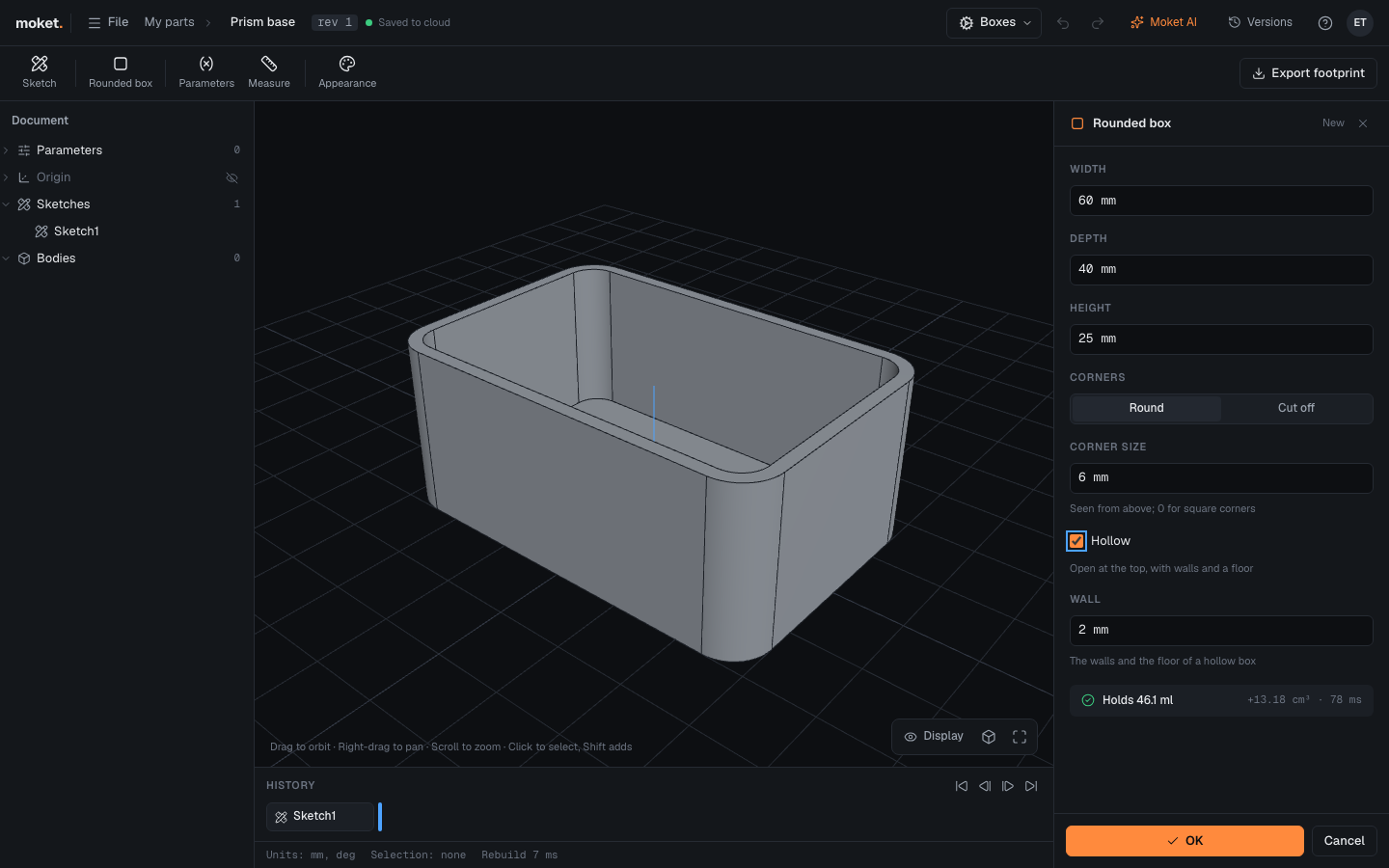
- Open a part, click the workbench at the right of the top bar and choose Boxes.
- Click Rounded box, turn on Hollow and click OK. The dialog says how much the box holds.
- Click Export footprint to export the box's outline at 1:1.
Rounded box makes a box on the XY plane around the origin. Its corners are round or cut off, and a hollow box is open at the top.
What a plugin is
A plugin is two files:
| File | What it holds |
|---|---|
moket-plugin.json | The manifest: the plugin's id, name and version, its features and their params, its workbench and its exports |
plugin.js | One ES module whose default export has a build for each feature and a function for each export, bundled with what it uses |
Moket reads the manifest without running your code: it makes each feature's dialog from its params, checks the values people type, and keeps parts that use the plugin openable for people who do not have it. Your code runs only to build: Moket gives it the evaluated values and what it picked, and it gives back bodies. See Declare features and params.
Build it yourself
Download the starter package and unzip it.
In the
rounded-boxfolder, install and build it:shnpm install npm run buildnpm run buildchecks the types, then writesdist/plugin.jsanddist/moket-plugin.json.Serve it to Moket from your computer:
shnpm run serveIn Moket, open Settings > Plugins > Install plugin and paste
http://localhost:5199/moket-plugin.json. If you installed the example from the help site, the dialog says this one replaces it.Change something in
src/plugin.ts, for example the message offail, and runnpm run buildagain.In Settings > Plugins, click Update next to Rounded box. Parts that use it rebuild with the new code when you open them.
Moket installs plugins from https addresses, and from http://localhost only while you write one.
Read the code
src/plugin.ts exports the plugin with definePlugin, which checks its shape in your editor:
ts
import { definePlugin, fail, nameResult, sweepSeeds } from '@moket/plugin-sdk';

export default definePlugin({
  features: {
    'com.example.rounded-box.box': {
      async build(ctx, params) {
        const width = ctx.value('width'); // mm, from the expression typed
        const hollow = params['hollow'] === true;
        // ...
        if (2 * radius >= Math.min(width, depth))
          throw fail(
            'The corners take the whole side: make them smaller',
            'radius',
          );
        const face = await ctx.kernel.makeProfileFace(plane, [segments]);
        const solid = await ctx.kernel.extrude(
          face.shape,
          plane.normal,
          height,
        );
        // ...
        return { bodies: { [params['body'] as string]: body }, data };
      },
    },
  },
  exports: {
    async footprint(ctx) {
      // ...
    },
  },
});ctx.value(name)gives a number param's value, in millimetres, radians or as a plain number. Choices, switches and picks are inparams.ctx.kernelmakes and changes shapes: profiles, extrusions, booleans, fillets, shells and more.fail(message, param)stops the feature with a message on the field to change.ctx.reportadds a note or a warning, like Holds 46.1 ml.- The result names every face, so features built on the box keep their references when its sizes change.
nameResultandsweepSeedsdo it the way Moket's Extrude does. datakeeps what the export needs, the box's sizes.
See Build a feature and Export from a plugin.
Make it yours
- In
moket-plugin.json, changeidto a reverse domain of your own, such ascom.yourname.tools. Every feature type starts with it. - Change
name, the features and their params, and the workbench's tools. - Write each feature's
buildinsrc/plugin.ts, under its type. - Raise
versionwhen you change the plugin, and a feature'sversionwhen you change its params. - Build, then click Update in Moket.
Share it
- By address: put the two files of
dist/on an https site that lets other sites fetch them (CORS), such as GitHub Pages, and share the address ofmoket-plugin.json. - By file: zip the
distfolder and share the zip. People install it with or choose a package file (.zip).
People who install your plugin get the version they installed. When you publish a new one, they get it when they click Update.
Use the SDK without the starter
The SDK's types download as one file, moket-plugin-sdk.d.ts. Save it in your project and map @moket/plugin-sdk to it in tsconfig.json:
json
{
  "compilerOptions": {
    "paths": { "@moket/plugin-sdk": ["./moket-plugin-sdk.d.ts"] }
  }
}
Its helpers (definePlugin, fail, nameResult, nameEdges, faceName, sweepSeeds) are in the starter's sdk/index.js; bundle them into your module. The bundle must be one ES module of at most 2 MB, with no imports left.