
Add text to a sketch
Text in a sketch becomes outlines you extrude like any profile: emboss a part number on a nameplate, or cut a label into a face. A text can show a parameter's value, so the part number follows the part.
Access: Sketch mode toolbar > Text.
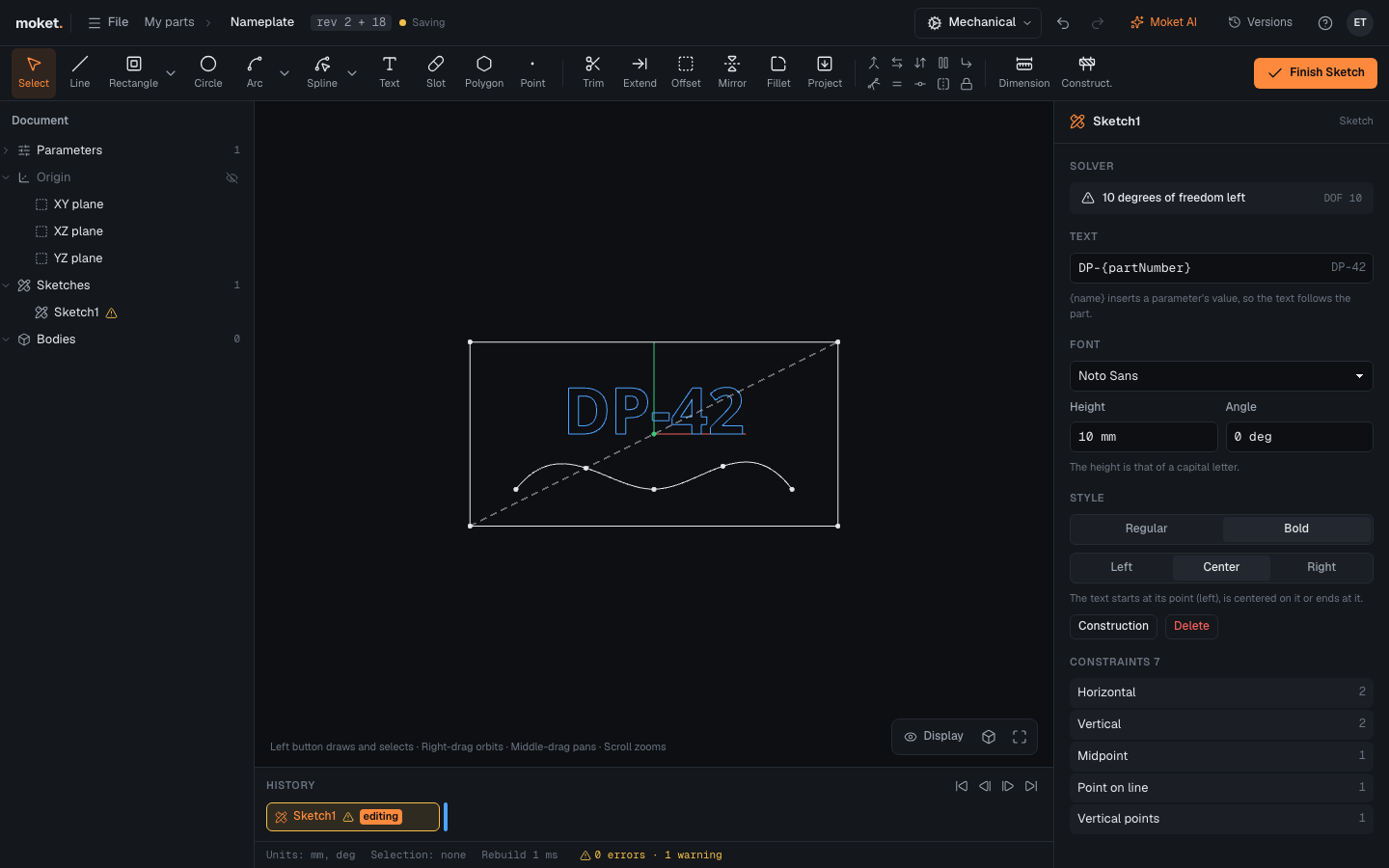
Add text
- Click Text.
- Click where the text starts. The text is placed with Text written in it and opens in the right panel.
- Type the text in the Text field and press
Enter. - Set the font, height and angle.
To engrave or emboss it, finish the sketch and extrude the letters: Cut into the face for engraved text, Join for raised text.
Options
| Option | Description |
|---|---|
| Text | Up to 200 characters, Latin, Cyrillic and Greek. {name} shows the value of the parameter name |
| Font | Noto Sans, Noto Sans Mono (every letter as wide) or Inter |
| Height | The height of a capital letter, an expression such as 6 mm or plateHeight / 4 |
| Angle | Turns the text about its point, an expression such as 90 deg |
| Weight | Regular or Bold |
| Alignment | The text starts at its point (Left), is centered on it (Center) or ends at it (Right) |
Show a parameter in the text
Write the parameter's name in braces: DP-{partNumber} or {baseWidth} mm; a project parameter as {project.axisZ}. The field shows the result on its right as you edit. The value is written in the part's units without the unit, and the text changes when the parameter does.
Move a text
Drag the text, or dimension and constrain its point: the point is where the baseline starts, its middle or its end, by Alignment.
Tips
- Letters with holes (O, A, 8) keep them when you extrude: their inner outline is a hole in the letter, and the inside of the hole is a region of its own.
- Put a text in a sketch of its own when you want to extrude only the letters; in a sketch with an outline around it, the letters are holes in that outline's region.
- Make a text construction (
X) to keep it in the sketch without making profiles.
Troubleshooting
| Message | What to do |
|---|---|
| The text uses {name}, which the part has no parameter for | Create the parameter, or correct the name in the text |
| The font ... is not available | Check your connection and reload: the fonts load from Moket the first time |
Limitations
- No italic, underline or text on a curve.
- Characters a font does not have are left out.
- Inter sets letters one by one, without ligatures and without its own kerning between letters.