
Draft
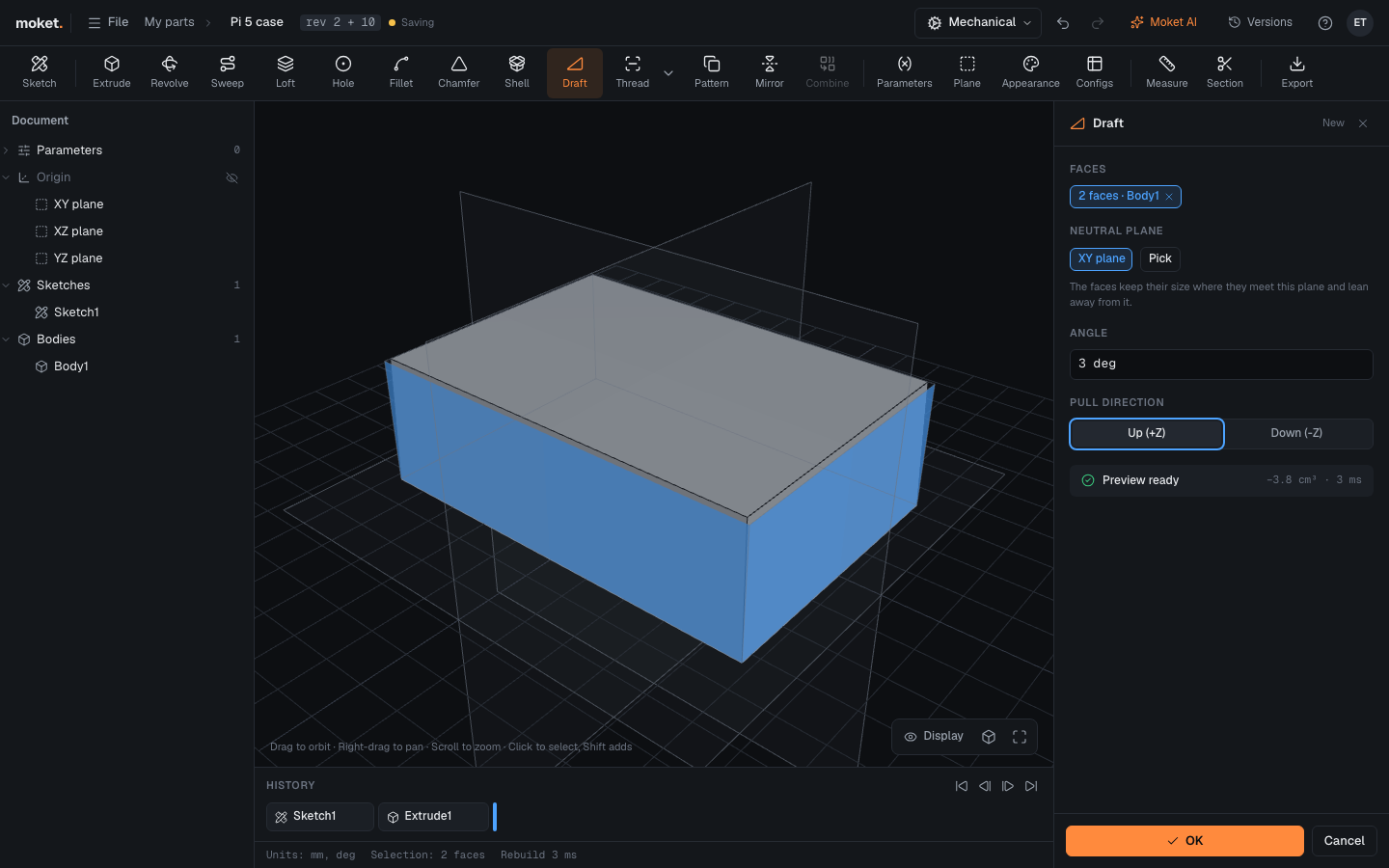
Draft tilts faces by a small angle so that a molded or cast part comes out of its mold. The faces keep their size where they meet the neutral plane and lean away from it along the pull direction.
Access: Toolbar > Draft.
Steps
- Click Draft.
- Click the faces to draft, usually the sides.
- Check the Neutral plane: the XY plane is used until you pick another. Click Pick, then a plane or a flat face.
- Enter the Angle and choose the Pull direction.
- Click OK.
Options
| Option | Description |
|---|---|
| Faces | The faces to tilt, all on one body |
| Neutral plane | An origin plane, a construction plane or a flat face; the faces keep their size where they meet it |
| Angle | How far the faces tilt, below 90 deg; 1 to 3 deg is common for molded parts |
| Pull direction | The way the part leaves the mold; the faces lean so the part gets narrower in this direction |
Tips
- Draft before Shell and Fillet, so the walls and the rounds follow the tilted faces.
- Drafted faces keep their names: fillets and sketches on them stay attached.
Troubleshooting
| Problem | What to do |
|---|---|
| Draft failed: this face cannot be tilted | The face is parallel to the neutral plane (like a top face) or meets it badly: unpick it, or pick another neutral plane |