
Fasten parts with screws
Fasten puts screws into holes for you. Click the edge of a hole: Moket reads how the hole goes through the assembly, proposes a screw from the standard parts library that fits it, and inserts it with a joint, in every hole like it on the same face. A washer under the head and a nut on a through hole come with it when you ask.
Access: assembly editor > Fasten.
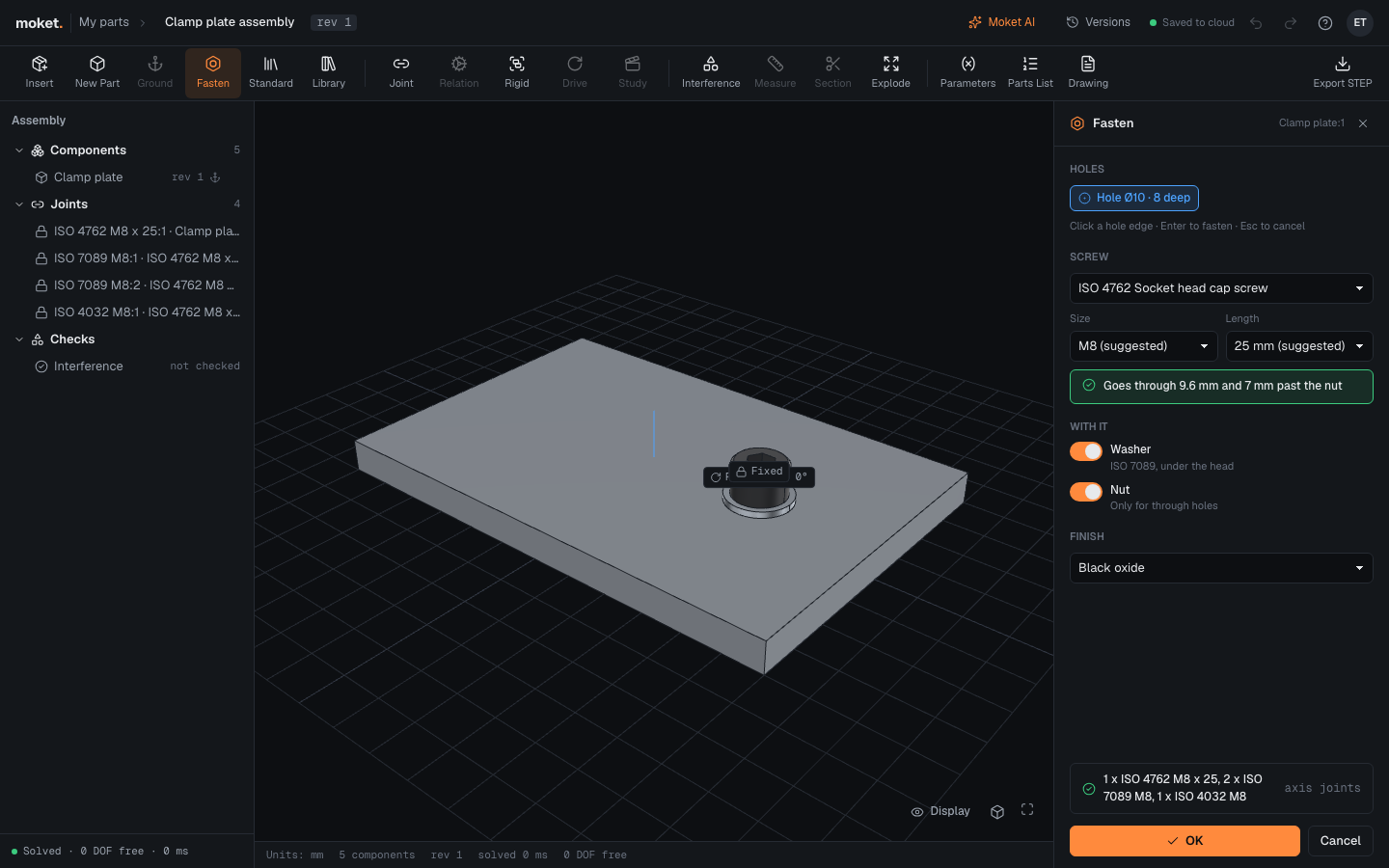
Fasten a hole
- Click Fasten.
- Click the round edge at the mouth of a hole, on the side the head goes. The panel shows the hole, for example Hole Ø4.5 · 8 deep, and +1 matching when other holes of the same size on the same face go through the same parts.
- Check the proposal: the Screw standard, its Size and Length, marked suggested. The green line says how much thread the screw engages.
- Switch on Washer or Nut if you want them, and choose a Finish.
- Click OK, or press
Enter.
The screws appear in the viewport while you choose. OK inserts them, with their washers and nuts, as one step you can undo with Ctrl+Z. Press Esc or click Cancel to leave without them.
How the screw is chosen
| The hole | The proposal |
|---|---|
| Goes through a part into a tapped hole of another part | The size whose tap drill the tapped hole is (Ø3.3 is M4). The length nearest to 1.5 diameters of thread engaged, at least 1.5 pitches, and never longer than a blind thread is deep |
| Is itself a tapped hole | The same, with the head on the hole's face |
| Goes through every part, without a thread | The largest size whose clearance hole it is (Ø4.5 is M4, ISO 273). Switch on Nut: the length reaches through the parts, the washers and the nut, with 2 pitches to spare |
| Ends in material without a thread, or is too small for any size | Nothing: the panel says why |
Choose another Size or Length and the check line says what it engages. Choose another Screw and the size and length are proposed again.
Options
| Option | What it does |
|---|---|
| Holes | The picked hole. +N matching fastens the holes like it on the same face too; click it to fasten only one. |
| Screw | Socket head, button head, countersunk and hex head screws of ISO and ANSI. |
| Size | The thread size. The hole's own is marked suggested. |
| Length | The standard lengths of the size. The one that fits the stack is marked suggested. |
| Washer | A plain washer (ISO 7089 or ASME B18.21.1) under the head, and under the nut when there is one. |
| Nut | A hex nut (ISO 4032 or ASME B18.2.2) on the far side of a through hole. |
| Finish | A finish for the screws over their own. |
Joints
Each screw sits on a revolute joint at the hole's mouth with its turn locked (Min and Max both 0 deg), so a fastened screw adds no degree of freedom and moves with the part it holds. To let a screw spin, select its joint and clear the limits. Its washers and nut are fixed to it. Select a screw to change its size later under Configuration in its properties; the joint stays.
Limitations
- Threads are not modeled yet: a screw in a tapped hole overlaps its material, and Check interference reports it.
- Fasten reads holes from what the viewport draws: very coarse holes of a few millimeters may need a closer look at the size it proposes.