
Keep notes in a project
A note is a Markdown document of a project. It keeps what the parts cannot show: what the product is for, what was decided and why, what was checked and what is still open. You and AI agents read and edit the same notes. Agents read a project's notes before they work on it and propose an update when they are done.
Access: in a project, New > Note. Open a note from its card.
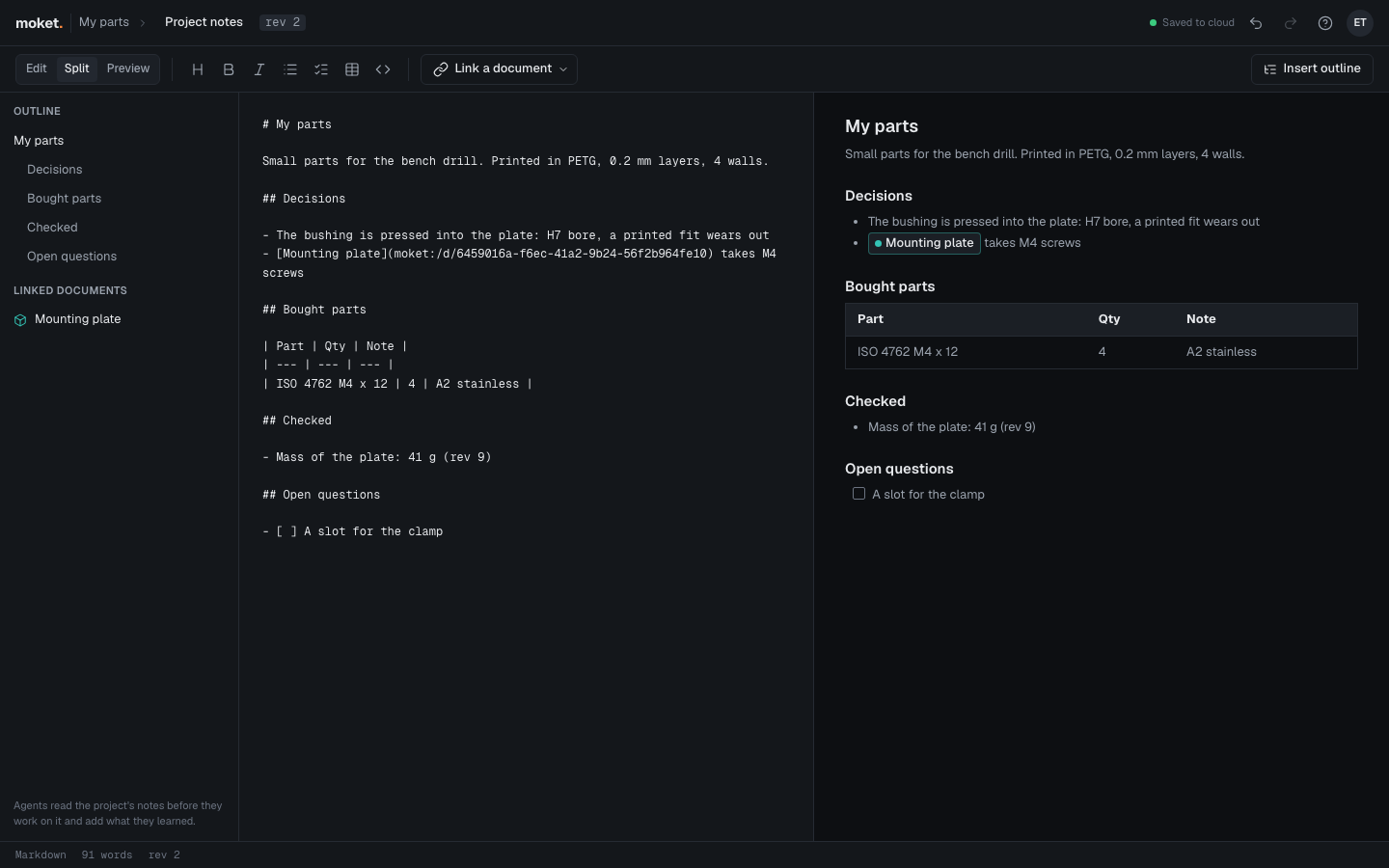
Make a note
- Open the project.
- Click New > Note.
The note opens with the suggested headings below, under the name Project notes. Rename it in the top bar: click its name.
Write in a note
- Type Markdown on the left. The preview on the right follows as you type.
- Use the buttons for a heading, bold, italic, a list, a checklist, a table or code. They work on the selected lines.
- To link a document of the project, place the cursor and click Link a document, then pick the document.
Moket saves the note as you type, as it saves parts, and Undo goes back a pause in typing at a time.
| Button or area | What it does |
|---|---|
| Edit / Split / Preview | Show the Markdown, both, or the preview |
| Link a document | Puts a link to a part, assembly, drawing or note of the project at the cursor |
| Insert outline | Adds the suggested headings the note does not have yet, at its end |
| Outline | The note's headings: click one to go to it |
| Linked documents | The documents the note links to: click one to open it |
A link to a document shows as a chip with the document's color and its current name, so renaming a part breaks no note. A link to a deleted document is struck through.
What to keep in a note
| Heading | What goes there |
|---|---|
| Purpose and requirements | What it is for, what it must do, the sizes and loads it must take |
| Decisions | What was chosen, the alternatives left and why |
| Parameters | What the main parameters mean and their safe ranges |
| Bought parts | Standard and library parts, materials and where they come from |
| Making it | Print or machining settings, tolerances and fits |
| Checked | Interference, motion studies, mass: what passed and at which version |
| Open questions | What is not decided or not done yet |
Short lines of facts read best. Do not put passwords, keys or personal data in a note.
Notes and AI agents
- An agent working on the project reads its notes first, and follows the decisions there unless you ask otherwise.
- At the end of a session that decided or checked something, the agent proposes an update to a section. It is a plan like any other change: it lists the sections it adds, changes and removes, with the lines added and removed in each, applies or waits for Apply as your approvals say, and is a version of the note in the agent's name. To read an agent's text before it goes into the note, check Any change in your approvals.
- Ask an agent to keep notes in words: "Add what we decided about the nut to the project notes".
Limitations
- Images in notes are not shown yet; their text stays.
- Raw HTML in a note shows as text.