
Thread
Thread puts a standard screw thread on a shaft or in a hole: metric and inch fastening threads, and trapezoidal and ACME threads for lead screws and their nuts. A cosmetic thread changes no geometry: it shows on the face, goes into STEP files and keeps the part fast. A modeled thread cuts the real helical groove, for 3D printing and close checks.
Access: Toolbar > Thread.
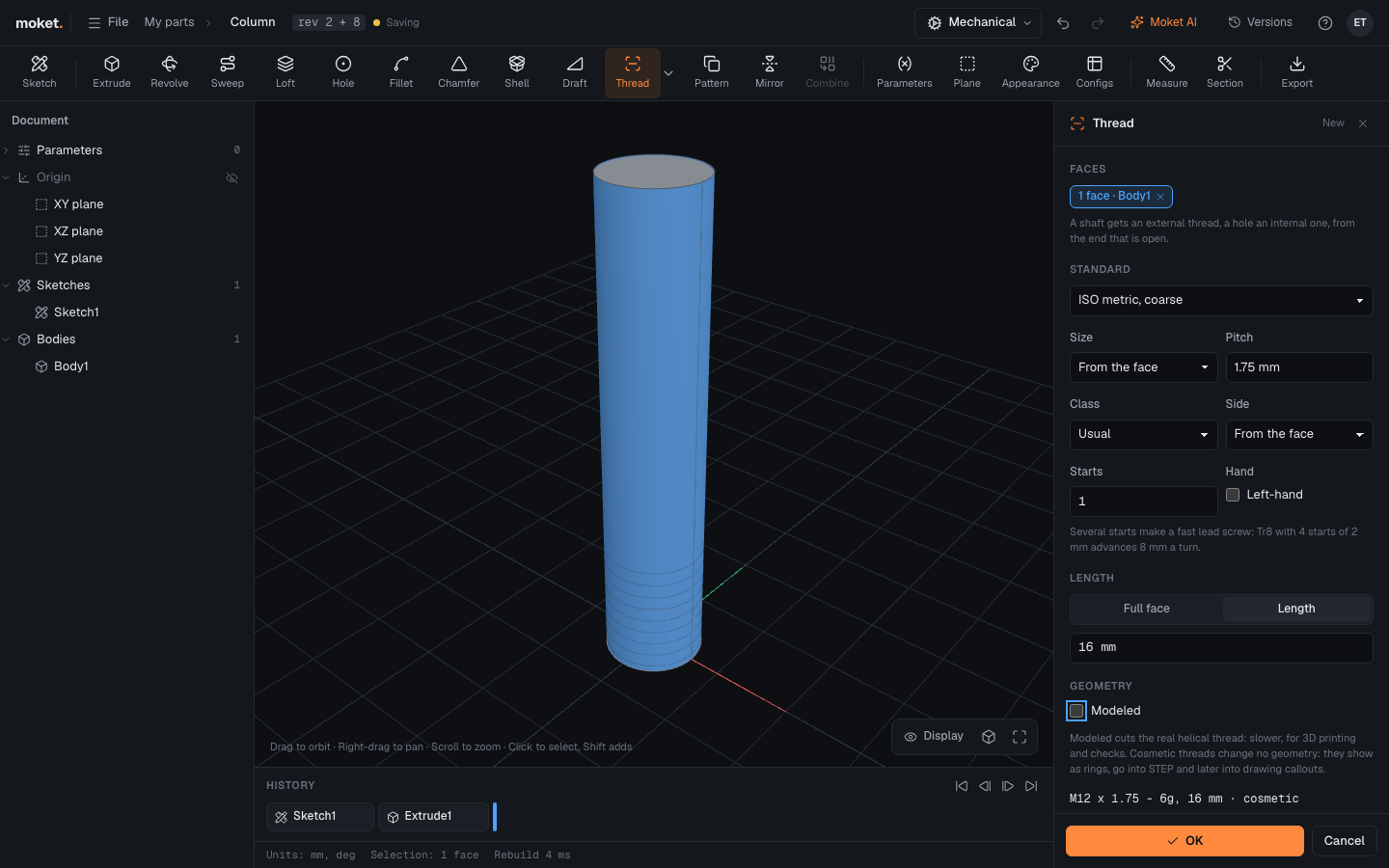
Steps
- Click Thread.
- Click the cylindrical faces to thread: the outside of a shaft or the inside of a hole.
- Choose the Standard. The size follows the face; choose another under Size if you need one.
- For a multi-start or left-hand thread, enter Starts and turn on Left-hand.
- Choose Full face or Length and enter the length.
- Turn on Modeled for real geometry.
- Click OK.
The panel shows the thread it made, for example M12 x 1.75 - 6g, 16 mm · cosmetic.
Options
| Option | Description |
|---|---|
| Standard | ISO metric, coarse, ISO metric, fine, UNC or UNF; for lead screws ISO metric trapezoidal (Tr) or ACME |
| Size | From the face: the size whose major diameter is the shaft's, or whose tap drill is the hole's. Or a size of the standard |
| Pitch | Follows the size |
| Class | The tolerance class: 6g and 6H by default for metric, 2A and 2B for UNC and UNF, 7e and 7H for Tr, 2G for ACME |
| Starts | How many threads run side by side: the screw advances starts x pitch a turn. 1 by default; an expression |
| Hand | Left-hand turns the other way. Right-hand by default |
| Side | From the face (a shaft is external, a hole internal), or External or Internal |
| Length | Full face, or a length from the start |
| Modeled | Cut the helical groove. Off: a cosmetic thread |
Lead screws
A lead screw and its nut use a trapezoidal or ACME thread. The thread name gives the size and pitch: Tr12x3 is 12 mm across with a 3 mm pitch, and 1/2-10 is 1/2 inch with 10 threads per inch.
- Nut: use a tapped hole with the same size. It is drilled to the nut's minor diameter, for example 9 mm for Tr12x3.
- Fast lead screws have several starts. A 3D printer's T8 screw is
Tr8x2with 4 starts: it advances 8 mm a turn and shows asTr8 x 8 (P2). - Bought nuts: trapezoidal hex nuts and the T8 flanged nut are in the standard parts.
- Interference: a screw and its nut count as engaged only when the size, the starts and the hand all match.
Where a thread starts
A thread starts at the open end of its face: the free end of a shaft, the mouth of a hole, the end next to a chamfer. When both ends are open, it starts at the lower end along the axis.
How threads show
- In the viewport a cosmetic thread is a set of rings along the face, one per pitch, and a dashed circle of the thread's other diameter where it starts.
- In STEP files the face is named by its thread, for example
Thread M6 x 1 - 6g, 20 mm, so other CAD programs see it. - In an assembly, a screw in a tapped hole of the same size and on the same axis is not an interference: the screw is modeled at its nominal diameter and the hole at its tap drill, and the ring between them is the thread.
Tips
- For a tapped hole, use the Tapped option of Hole: it drills the tap drill and threads the hole in one step.
- Screws and nuts from the standard parts library come with cosmetic threads.
- Keep threads cosmetic unless you print the part or check a fit: modeled threads make many faces and slow rebuilds.
Troubleshooting
| Message | What to do |
|---|---|
| A thread goes on a cylindrical face | Pick round faces only |
| Starts must be a whole number, 1 to 12 | Enter a whole number of starts |
| No metric thread fits a shaft of Ø... | The face is no standard size: choose the Size, or make the face a standard diameter |
| A ... thread wants a hole of Ø...; the face is Ø... | The size does not match the face; the thread is made anyway |
| A face with a thread is gone; the thread is not shown | A later change removed the face: edit the thread and pick the face again |
Limitations
- Threads on cones (pipe threads) are not available.
- Buttress, stub ACME and centralizing ACME threads are not available.